


Moving servers to the cloud becomes much more useful when your company’s systems can keep talking to them over a private network. A site-to-site VPN in the cloud creates that link: the office router or firewall establishes an encrypted tunnel to the cloud environment, enabling communication between the authorized networks.
On Master da Web’s public cloud, this integration brings together Cloud Servers, VPC, and VPN Gateway. You can keep applications and databases on private addresses and connect your on-premises infrastructure to the cloud from the same panel.
What is a site-to-site VPN and how does it work?
A site-to-site VPN connects entire networks. Instead of installing a VPN app on every computer in the office, the administrator configures the equipment that links the local network to the cloud.
When a computer accesses a server on an authorized remote network, the routes direct the traffic into the tunnel. At the other end, the gateway forwards the packets to the VPC. For communication to work in both directions, addressing, routes, and firewall permissions need to be consistent on both networks.
This allows, for example, the management system in the office to access an application in the cloud, or a cloud server to communicate with a service on the local network, without exposing those applications directly to the internet.
A practical architecture: office connected to the VPC
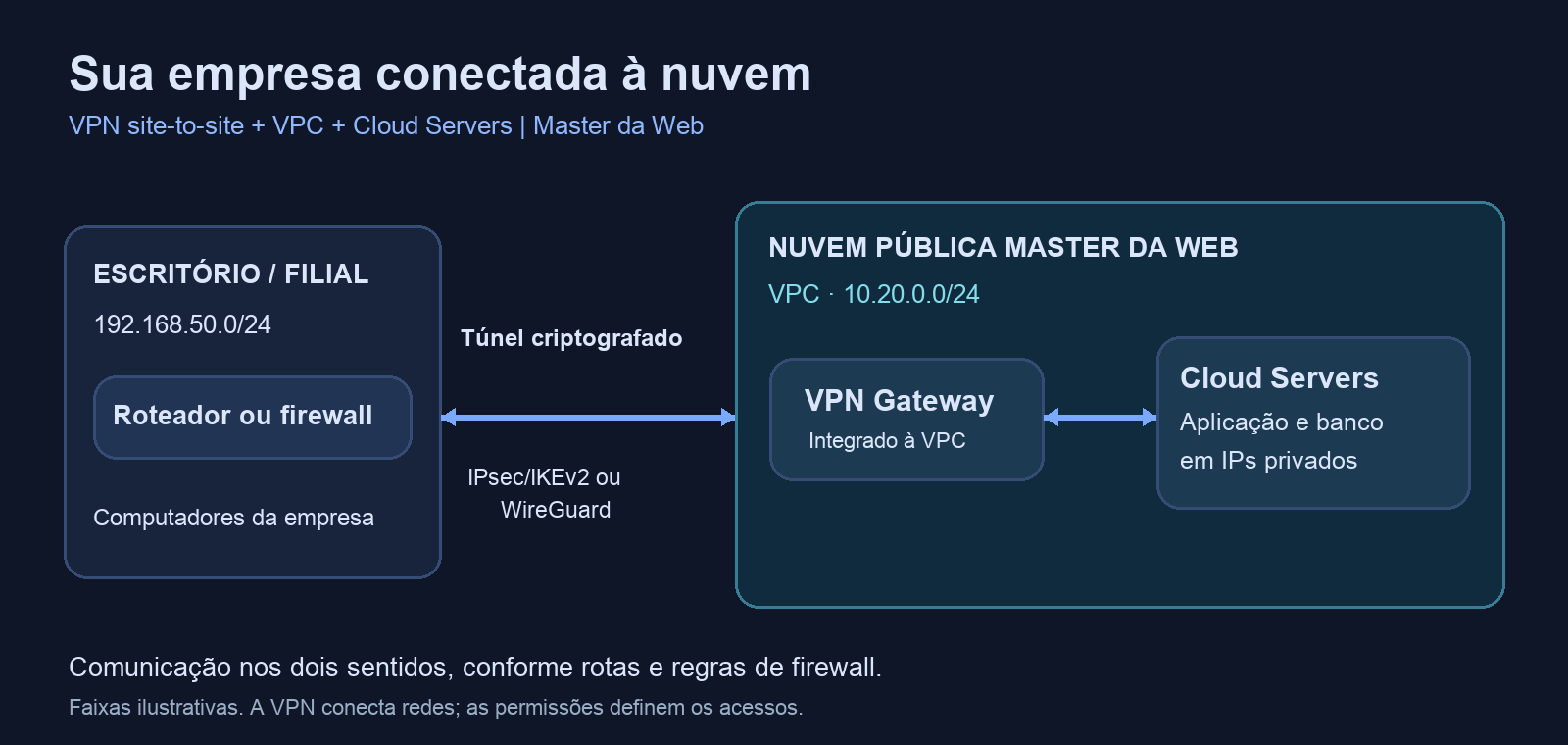
Imagine a company with the local network 192.168.50.0/24 and a cloud VPC with the range 10.20.0.0/24. The addresses in this example are illustrative.
- At the office: the router or firewall establishes the tunnel to the VPN Gateway.
- In the cloud: the VPN Gateway is part of the same VPC as the Cloud Servers.
- In the applications: services communicate over private IPs, according to the allowed routes and rules.
The VPC organizes private communication between cloud resources. The VPN extends connectivity to the company network. These are complementary functions: the VPC creates the private network in the cloud, and the tunnel links that network to the external environment.
How to integrate a site-to-site VPN with your cloud infrastructure
1. Plan the networks that need to communicate
List the office subnets and the VPC range. They must be different: if both sides use the same block, routing becomes ambiguous. The platform checks for overlaps with the VPC, the remote access pool, and other gateway connections.
Also define which systems and ports need to be accessed. Establishing the tunnel is one part of the job; opening only the necessary communication in the firewalls completes the integration.
2. Place the servers and the gateway in the same VPC
Organize your Cloud Servers within Master da Web’s Virtual Private Cloud and associate the VPN Gateway with that network. This way, the connection reaches the private environment where the applications are hosted.
You can structure an environment with the application and database on private IPs, keeping public exposure only for the services that truly need it.
3. Register the site and choose the protocol
In the site-to-site VPN section of the panel, enter the remote equipment and the networks behind it. The service offers IPsec with IKEv2 and WireGuard. The choice depends on your router or firewall’s support and the integration requirements.
It’s also possible to configure a site whose public IP changes: in this mode, the remote equipment initiates the connection to the gateway. You’ll need to allow the traffic in the firewall and check the local network’s NAT conditions.
4. Configure the company’s equipment
The panel provides configuration files or parameters for equipment and environments such as MikroTik RouterOS 7, pfSense, OPNsense, FortiGate, Cisco IOS, Linux, AWS, and Azure, depending on the protocol chosen. For WireGuard, options are available for MikroTik, Linux, and compatible equipment.
These materials guide the configuration on the other end. Software version, interfaces, licensing, and equipment policies may require adjustments by the administrator. The networks and cryptographic parameters must match on both sides.
5. Check the routes and test the application
The integration distributes routes to the site networks via DHCP within the VPC. Whether these routes are applied depends on the instance’s operating system and network configuration. Machines with manually configured IPs may need explicit routes; the panel provides guidance for Linux and Windows.
After establishing the tunnel, test the actual service, such as the connection to the management system or the authorized database. Check the round-trip path and the firewall rules. A connected tunnel alone doesn’t prove that the entire application is accessible.
What features does the integrated VPN offer?
- Two protocols for sites: IPsec/IKEv2 and WireGuard, depending on the compatibility of the remote environment.
- Multiple networks per connection: each registration accepts up to eight remote subnets, with addressing validations.
- Plan-based expansion: the number of site connections included is shown in the panel and varies depending on the plan contracted.
- Operational visibility: tunnel status, traffic counters, event history, and guidance for authentication, negotiation, or connectivity failures.
- Remote access on the same gateway: OpenVPN users can access the VPC and connected sites, subject to network permissions.
- Optional NAT Gateway: the gateway can centralize outbound traffic from private instances to the internet through its public IP.
Sizing should take into account the links on both ends, the remote equipment, the protocol, the application profile, and the gateway’s resources. A plan’s nominal speed is not a guarantee of encrypted throughput in every scenario. For latency-sensitive applications or heavy transfers, validate performance under a representative load.
When is it worth using a site-to-site VPN in the cloud?
System integration: connecting cloud applications to services that remain in the office. Gradual migration: moving workloads in stages while both environments stay connected. Branch offices: giving access to systems centralized in the cloud, with connections sized for each location. Hybrid environments: keeping part of the infrastructure on-premises and part in the cloud, with private communication between the networks.
Frequently asked questions about site-to-site VPN
Does every computer need to install a VPN?
No. In a site-to-site connection, the tunnel runs on the router or firewall. Devices on the network use the configured routes. For people outside the office, OpenVPN remote access serves a different need and can coexist on the same gateway.
Does the office need a fixed public IP?
The service allows you to configure one end with a dynamic address, where the company’s equipment initiates the tunnel. Feasibility depends on connectivity, NAT, and the rules of the remote environment.
Does the VPN replace firewall rules?
No. The VPN protects traffic between the endpoints, while the firewall defines which networks, machines, and services can communicate. Use both layers together.
Can I connect to another cloud?
Yes, there are parameters for IPsec integration with AWS and Azure. Configuration also depends on the resources, policies, and costs of the provider on the other end.
Site-to-site VPN and cloud infrastructure in one place
Master da Web offers both site-to-site VPN and integrated public cloud infrastructure. You can combine Linux and Windows Cloud Servers, VPC, and VPN Gateway to connect your company to your cloud systems and manage these resources on the same platform.
Discover Master da Web’s VPN Gateway and talk to our team to size the connections and cloud infrastructure for your environment.