


Data protection and connection privacy are central themes in any modern corporate environment. Within this context, the VPN Gateway stands out as a strategic solution to ensure secure and controlled connections, whether in a business structure or for users who need to access servers (such as a VPS) in a protected manner.
In this article, we will explore what a VPN Gateway is, how the concepts of split tunnel and full tunnel (with NAT) work, and the advantages of using it for connections with VPS (Virtual Private Server) and other practical use cases.
What is a VPN Gateway?
A VPN Gateway is the secure entry point for VPN connections to a private network. It is responsible for authenticating users, encrypting transmitted data, and ensuring that only authorized devices can access internal resources.
Unlike traditional VPN services aimed at anonymous browsing, the VPN Gateway is used to connect devices to a private network—whether a corporate network, cloud infrastructure, or a VPS server—with a focus on security, traffic control, and access segmentation.

Split Tunnel vs Full Tunnel: how is Traffic Routed?
When configuring a VPN, one of the most important points is deciding how user traffic will be routed. The two most common modes are:
Split Tunnel
In Split Tunnel mode, only traffic destined for the private network (corporate resources, internal servers, etc.) passes through the VPN. All the rest (access to external sites like Google, YouTube, etc.) continues to go out directly through the user’s local connection.
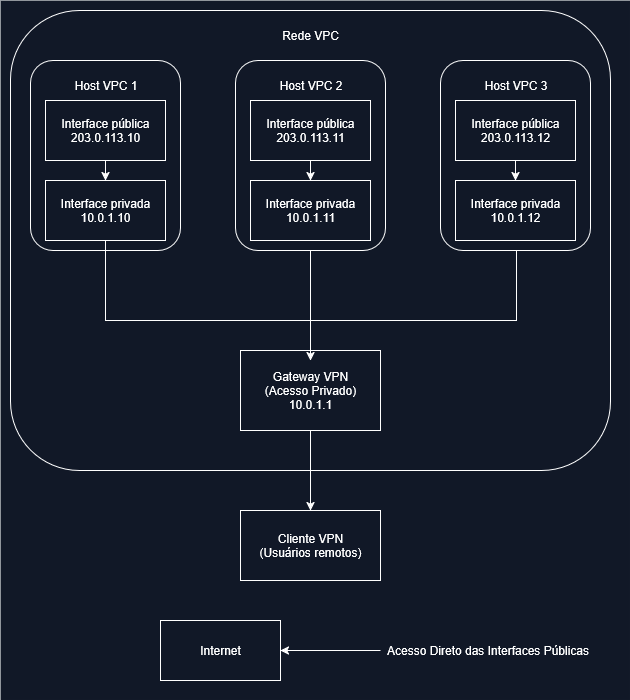
Advantages:
- Better performance and less latency for external traffic.
- Less bandwidth usage on the VPN server.
- Suitable when only part of the traffic needs to be protected.
Disadvantages:
- Sensitive traffic may leak through the local connection.
- Less centralized control over the user’s external traffic.
Ideal for:
Development and Staging Environments
- Public Staging: Accessible for client demos and testing
- Private Development: Secure access for developers via VPN
- CI/CD Integration: Build systems access via private interface
- Monitoring: External monitoring via public, internal via private
SaaS Applications with Admin Access
- Customer Portal: Public web interface for end users
- Admin Dashboard: Private interface accessible only via VPN
- API Endpoints: Public API for integrations, private for admin
- Database Access: Secure connections to the database via private network
Full Tunnel with NAT on the Gateway
In Full Tunnel mode, all device traffic is routed through the VPN Gateway, regardless of whether it’s an internal or external destination. However, in the Master da Web solution, the VPN Gateway operates with NAT (Network Address Translation), creating two network interfaces on the client (local and VPN), and redirecting all external traffic to exit through the VPN Gateway’s own public interface.
In other words:
- The user continues to access the internet normally.
- However, the outgoing traffic to external sites happens through the VPN Gateway’s public IP, not through the user’s local connection.
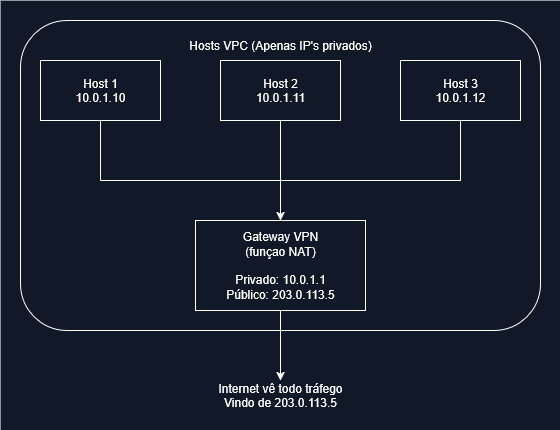
Example of NAT Translation:
- Host 10.0.1.10 makes HTTP request to google.com
- VPN Gateway translates:
10.0.1.10:45678 -> 203.0.113.5:12345 - Internet sees request from
203.0.113.5:12345 - Response returns to
203.0.113.5:12345 - VPN Gateway translates back:
203.0.113.5:12345 -> 10.0.1.10:45678
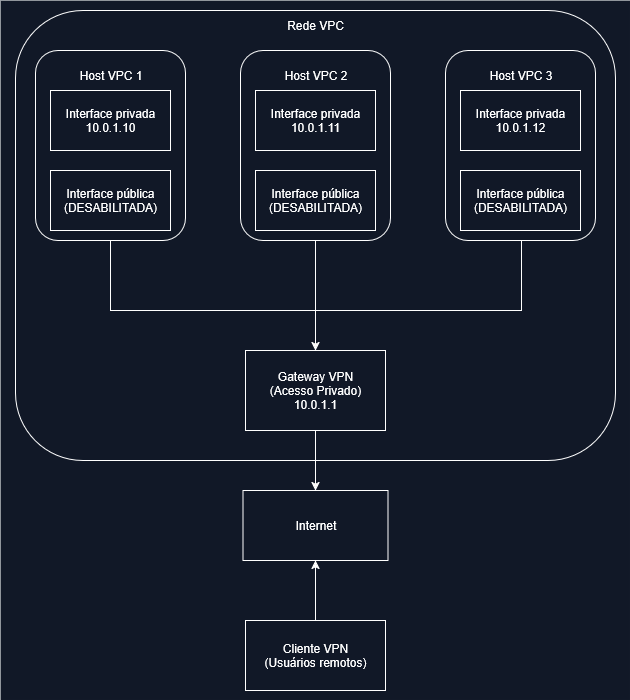
Advantages:
- All traffic is encrypted and monitored, increasing security.
- The visible public IP in accesses is that of the VPN Gateway, ensuring anonymization and control.
- Useful for applying centralized security policies (firewalls, monitoring, blocking).
Disadvantages:
- May increase latency depending on the VPN server location.
- Consumes more Gateway resources as all traffic passes through it.
Ideal for:
Maximum Security Environments
- Financial Services: Trading platforms requiring complete traffic supervision
- Healthcare: HIPAA-compliant applications with strict data controls
- Government: Classified systems with mandatory traffic inspection
- Corporate Compliance: Environments requiring complete audit trails
Hosting Private Applications
- Internal APIs: Backend services not intended for public access
- Database Servers: Secure database access only through VPN
- Development Environments: Isolated development and testing
- Legacy Applications: Modernization without internet exposure
Why Use VPN Gateway for VPS Connections?
Connecting to a VPS (Virtual Private Server) via VPN Gateway offers several advantages in terms of security and management:
- Total Infrastructure Isolation: The VPS can be configured to accept connections only through the VPN, eliminating the need to expose public ports and IPs directly.
- Protection Against External Attacks: By not exposing services directly on the internet, the server’s attack surface is drastically reduced.
- Secure and Private Routing: Using Full Tunnel with NAT, all VPS traffic will exit through the VPN Gateway, ensuring privacy and compliance.
- Simplified Access Management: Through the Master da Web panel, it’s possible to create individual VPN users, define specific routes, and monitor accesses in real-time.
- Support for Hybrid Environments: The VPN Gateway allows secure integration of local networks (on-premises) with VPCs and VPS in the cloud.
Where to hire?
Master da Web offers the VPN Gateway service with the aim of providing its customers greater control, security, and centralized management over their VPS environments. For this, the company provides a robust solution, with strategic differentials that ensure flexibility, performance, and high availability in VPN connections:
- Configuration of private VPN subnets and route pushing.
- Quick switching between Split Tunnel and Full Tunnel with NAT modes.
- Creation and management of multiple VPN users, with automatic distribution of configuration profiles.
- Visualization of the Gateway’s public IP and connection history.
- Real-time application of changes, with a Pending Changes panel.
How to Purchase?
To purchase the VPN Gateway, it is necessary to have at least one active VPS service with Master da Web, integrated into a VPC (Virtual Private Cloud). If you don’t have a VPS yet, you can acquire one by clicking here.
Step-by-step for Contracting
Access the Master da Web Dashboard
Enter the client area and select the desired VPS service.
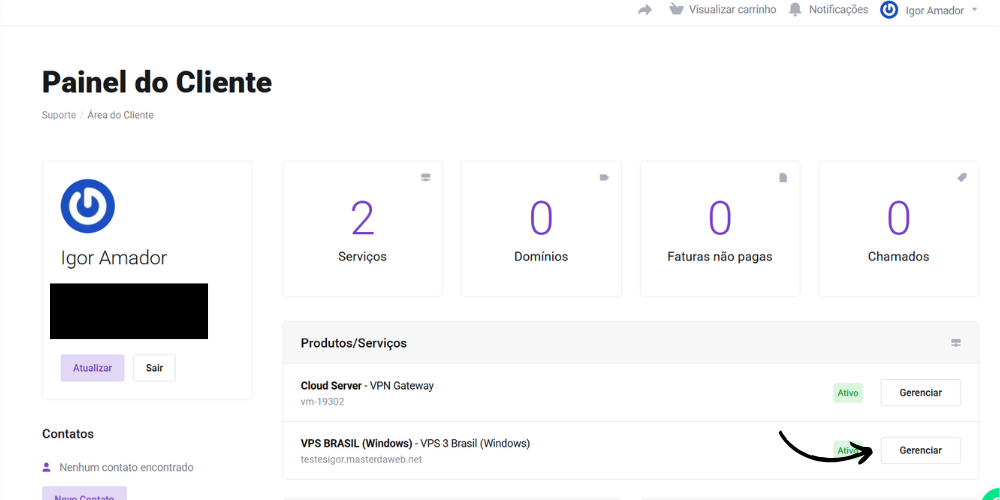
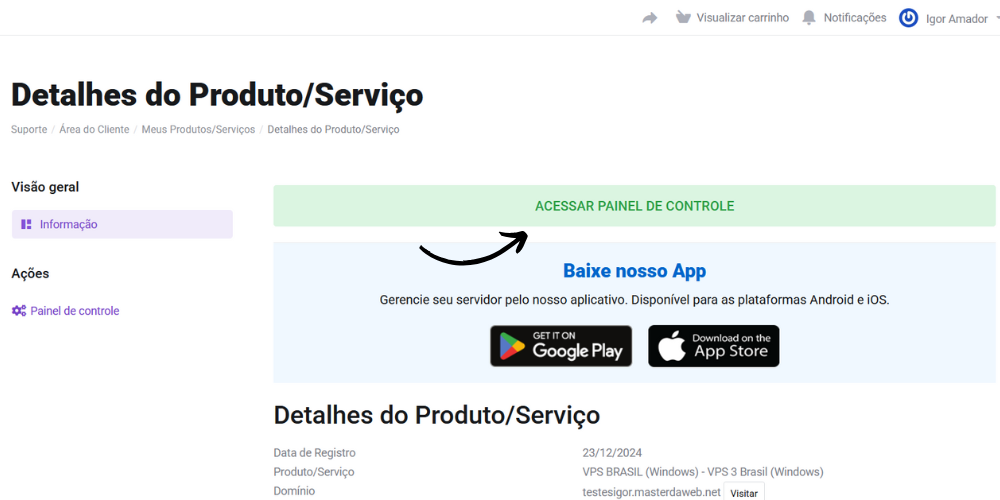
Navigate to the Control Panel
On the Product/Service Details page, click on “Access control panel”.
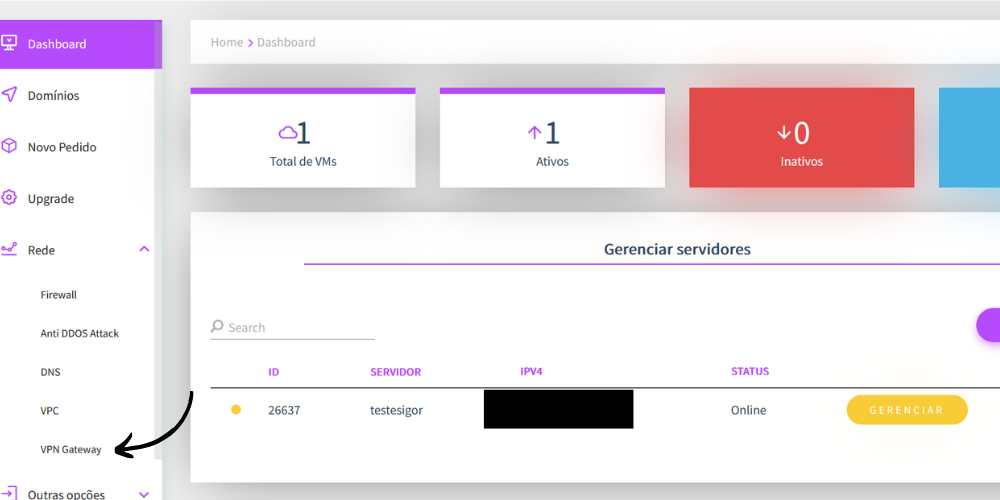
Select the “VPN Gateway” Option
In the Dashboard, locate the “Network” section and choose “VPN Gateway”.
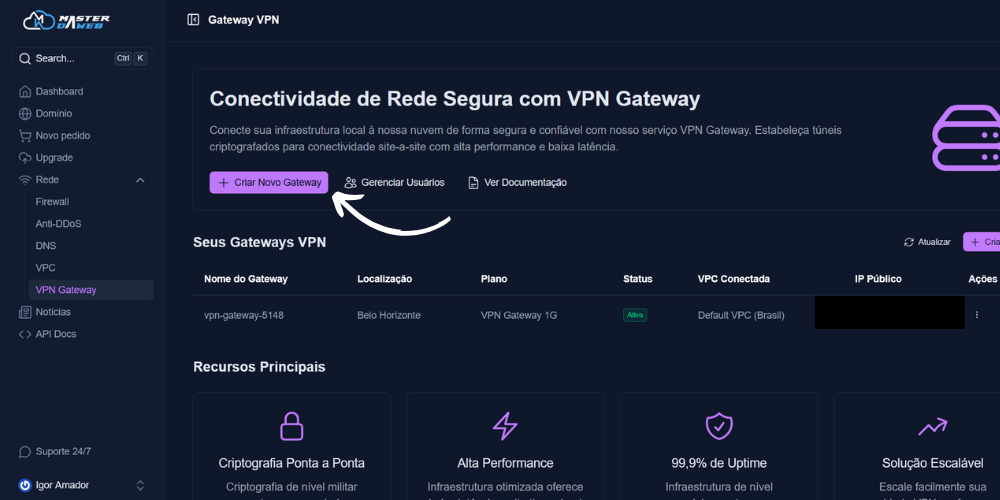
Start the Contracting Process
On the VPN Gateway page, click on “Create new gateway” to proceed.
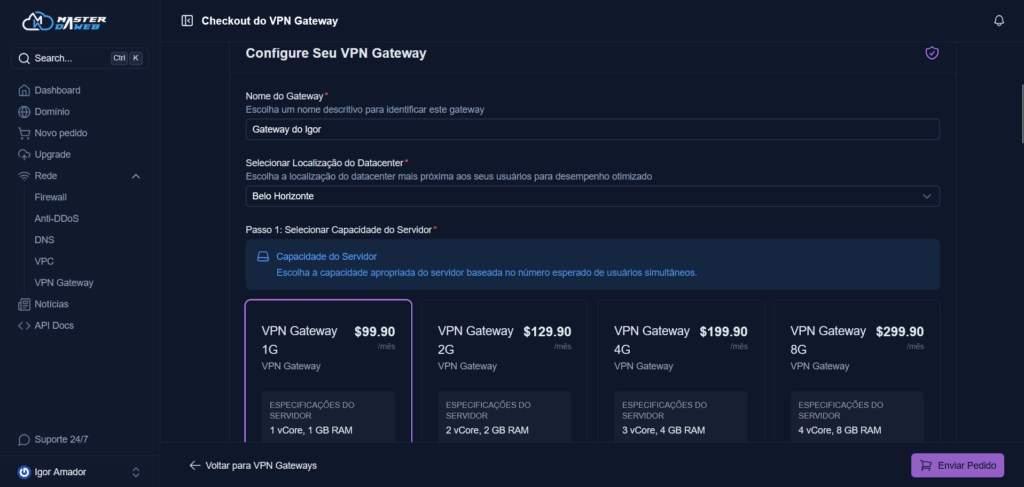
Configure the Service
- Gateway Name: Define a clear identifier for your VPN.
- Datacenter Location: Choose between Belo Horizonte (Brazil) or Dallas (USA).
- Server Capacity: Select the ideal plan for your use case. (Values in R$)
- Payment Cycle: Monthly (no discount), quarterly (5% off), semi-annual (10% off) or annual (15% off).
- Payment Method: Credit card (+4%), PayPal (+5%), PIX or bank slip.
- Associated VPC (optional): Link to an existing VPC or opt for a default VPC for later configuration.
Finalize the Contract
After reviewing the settings, click on “Submit order” and complete the payment. The service will be available immediately after confirmation.
Configure VPN
In the VPN Gateway actions section, you will find several essential features:
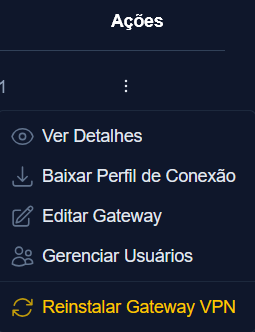
View Details: Check current settings, including protocol (UDP/TCP), operation mode (Split Tunnel or Full Tunnel), and network information.
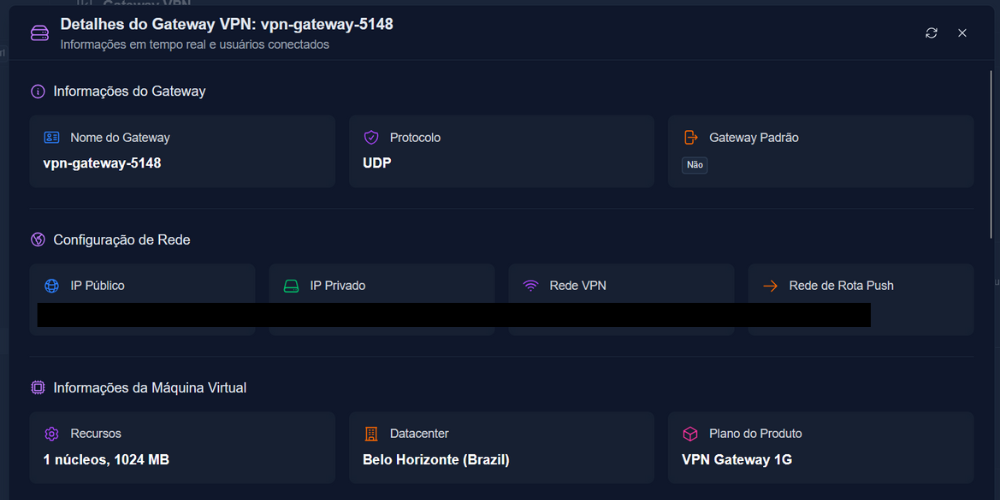
On this screen, you can see: gateway name, protocol (udp or tcp), default gateway (where: no = split tunnel, yes = full tunnel), network settings, the configurations of the machine hosting the VPN, the information of the VPC hosting the VPN, and information related to user connections.
- Download Connection Profile: Obtain OpenVPN configuration files compatible with computers, mobile phones, and other devices.
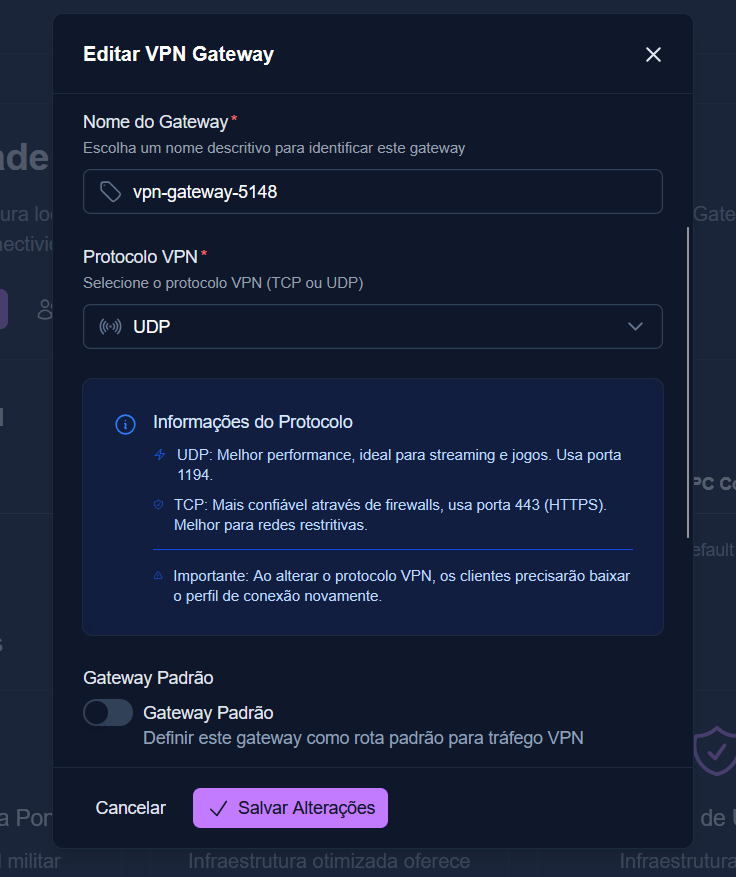
- Edit Gateway: Customize:
- Gateway name.
- Protocol (UDP for performance or TCP for enhanced security).
- Operation mode (Split Tunnel or Full Tunnel).
- Permission for multiple simultaneous connections per user. Example:
Userigor@teste.comcan connect with the VPN from both mobile and computer devices simultaneously, without needing two accounts.
- Manage Users: Add, edit, or deactivate accounts, adjusting email, password, and access status.
- Reinstall Gateway: Completely restart the service settings, if necessary.
Conclusion
The Master da Web VPN Gateway goes beyond a simple encrypted tunnel — it’s a strategic solution for security, remote access, and hybrid network architecture. With flexibility to adapt to different scenarios — from traffic optimization with Split Tunnel to absolute control with Full Tunnel — our platform is ideal for:
- Protecting VPS connections.
- Ensuring secure access for remote teams.
- Managing corporate networks with high availability and compliance.
Invest in a robust and scalable infrastructure. Get the VPN Gateway now and elevate your network environment to a new level of excellence.