


In this tutorial I’ll be teaching you how to build a Restful service on Android using Android Annotations v4.2. I’ll use a PHP server as an example.
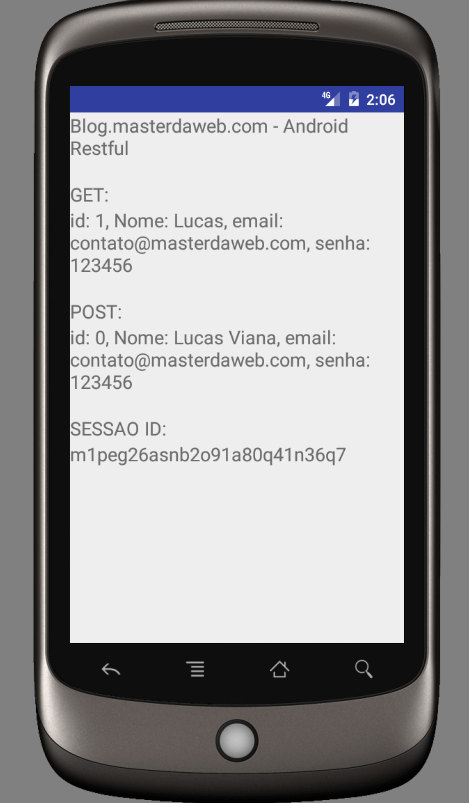
Libraries used:
- Android Annotations v4.2
- Spring Framework v2.0.0.M3 (Android version)
- Jackson Databind v2.8.5
If you would like to delve deeper into the resources described here in this tutorial, I recommend accessing the following documentation:
- https://github.com/androidannotations/androidannotations/wiki/Rest-API
- https://github.com/FasterXML/jackson-annotations
To download the complete project: RestApplication
The Webservice in PHP:
<?php
/**
 * http://blog.masterdaweb.com
 * User: Lucas
 * Date: 17/12/2016
 * Time: 14:22
 */
ini_set("log_errors", 1);
ini_set("error_log", "php-error.log");

$data = json_decode(file_get_contents("php://input"));

switch ($_GET['acao']) {
    case 'buscar':
        header('Content-Type: application/json');
        $output = json_encode(
            array(
                'id' => $_GET['id'],
                'nome' => 'Lucas',
                'email' => 'contato@masterdaweb.com',
                'senha' => '123456'
            )
        );
        break;
    case 'cadastrar':
        header('Content-Type: application/json');
        $output = json_encode(
            array(
                'nome' => $data->nome,
                'email' => $data->email,
                'senha' => $data->senha
            )
        );
        break;
    case 'pagina-protegida':
        header('Content-Type: text/html');
        session_start();
        $output = session_id();
        break;
}
echo $output;
Now the Android app
apply plugin: 'com.android.application'

buildscript {
    repositories {
        jcenter()
    }
    dependencies {
        classpath 'com.android.tools.build:gradle:2.2.3'
        classpath 'com.neenbedankt.gradle.plugins:android-apt:1.8'
        // NOTE: Do not place your application dependencies here; they belong
        // in the individual module build.gradle files
    }
}

allprojects {
    repositories {
        jcenter()
    }
}

android {
    compileSdkVersion 25
    buildToolsVersion "25.0.1"
    defaultConfig {
        applicationId "com.example.lucas.restapplication"
        minSdkVersion 15
        targetSdkVersion 25
        versionCode 1
        versionName "1.0"
    }
    buildTypes {
        release {
            minifyEnabled false
            proguardFiles getDefaultProguardFile('proguard-android.txt'), 'proguard-rules.pro'
        }
    }
    packagingOptions {
        exclude 'META-INF/spring.tooling'
        exclude 'META-INF/spring.handlers'
        exclude 'META-INF/spring.schemas'
        exclude 'META-INF/LICENSE'
    }
}

apply plugin: 'com.android.application'
apply plugin: 'android-apt'
def AAVersion = '4.2.0'

dependencies {
    compile fileTree(include: ['*.jar'], dir: 'libs')
    compile 'com.android.support:appcompat-v7:25.0.1'
    apt "org.androidannotations:androidannotations:$AAVersion"
    compile "org.androidannotations:androidannotations-api:$AAVersion"
    apt "org.androidannotations:rest-spring:$AAVersion"
    compile "org.androidannotations:rest-spring-api:$AAVersion"
    compile "org.springframework.android:spring-android-rest-template:2.0.0.M3"
    compile 'com.fasterxml.jackson.core:jackson-databind:2.8.5'
}
The User class described below is our Model, it will bind with the webservice, this is possible thanks to Jackson Bind:
@JsonIgnoreProperties(ignoreUnknown = true)
public class Usuario implements Serializable {

    @JsonProperty("id")
    private int id;

    @JsonProperty("nome")
    private String nome;

    @JsonProperty("email")
    private String email;

    @JsonProperty("senha")
    private String senha;

    public Usuario(String nome, String email, String senha) {
        this.nome = nome;
        this.email = email;
        this.senha = senha;
    }

    public Usuario() {
    }

    public int getId() {
        return id;
    }

    public String getNome() {
        return nome;
    }

    public String getEmail() {
        return email;
    }

    public String getSenha() {
        return senha;
    }

    @Override
    public String toString(){
        return "id: " + getId() + ", Nome: " + getNome() + ", email: " + getEmail() + ", senha: " + getSenha();
    }
}
Now we’ll define our Rest class:
@Rest(rootUrl = "http://10.0.2.2", converters = {MappingJackson2HttpMessageConverter.class, StringHttpMessageConverter.class, FormHttpMessageConverter.class})
public interface MyRestClient {

    //Busca o recurso 'usuario' pelo id
    @Get("/rest.php?acao=buscar&id={id}")
    Usuario getUsuarioById(@Path int id);

    //Cadastra o recurso 'usuario'
    @Post("/rest.php?acao=cadastrar")
    Usuario postUsuario(@Body Usuario usuario);

    //Acessa página protegida usando ID da sessão PHP
    @Get("/rest.php?acao=pagina-protegida")
    @RequiresCookie("PHPSESSID")
    String paginaProtegida();

    void setHeader(String name, String value);

    String getHeader(String name);

    void setCookie(String name, String value);

    String getCookie(String name);

}
The IP 10.0.2.2 must be replaced by the address of your Webservice. If you are using a localhost server, keep this IP so that the emulator can access localhost, because if you put “localhost” in place of this IP, the emulator will not recognize your localhost environment.
@EActivity(R.layout.activity_main)
public class MainActivity extends Activity {

    @RestService
    MyRestClient rest;

    @ViewById
    TextView getResponse, postResponse, sessaoResponse;

    Usuario getUsuario;
    Usuario postUsuario;
    String sessaoId;

    @AfterViews
    void load() {
        runRest();
    }

    @Background
    void runRest() {
        getUsuario = rest.getUsuarioById(1);

        postUsuario = rest.postUsuario(new Usuario("Lucas Viana", "contato@masterdaweb.com", "123456"));

        rest.setCookie("PHPSESSID", "m1peg26asnb2o91a80q41n36q7");
        sessaoId = rest.paginaProtegida();

        setData();
    }

    @UiThread
    void setData(){
        getResponse.setText(getUsuario.toString());
        postResponse.setText(postUsuario.toString());
        sessaoResponse.setText(sessaoId);
    }

}
And finally our View:
<?xml version="1.0" encoding="utf-8"?>
<LinearLayout xmlns:android="http://schemas.android.com/apk/res/android"
    xmlns:tools="http://schemas.android.com/tools"
    android:id="@+id/activity_main"
    android:layout_width="match_parent"
    android:layout_height="match_parent"
    android:orientation="vertical">

    <TextView
        android:layout_width="wrap_content"
        android:layout_height="wrap_content"
        android:textSize="18dp"
        android:layout_marginBottom="20dp"
        android:text="Blog.masterdaweb.com - Android Restful" />

    <TextView
        android:layout_width="wrap_content"
        android:layout_height="wrap_content"
        android:textSize="18dp"
        android:text="GET:" />

    <TextView
        android:id="@+id/getResponse"
        android:layout_width="wrap_content"
        android:layout_height="wrap_content"
        android:layout_marginBottom="20dp"
        android:textSize="18dp" />

    <TextView
        android:layout_width="wrap_content"
        android:layout_height="wrap_content"
        android:textSize="18dp"
        android:text="POST:" />

    <TextView
        android:id="@+id/postResponse"
        android:layout_width="wrap_content"
        android:layout_height="wrap_content"
        android:layout_marginBottom="20dp"
        android:textSize="18dp" />

    <TextView
        android:layout_width="wrap_content"
        android:layout_height="wrap_content"
        android:textSize="18dp"
        android:text="SESSAO ID:" />

    <TextView
        android:id="@+id/sessaoResponse"
        android:layout_width="wrap_content"
        android:layout_height="wrap_content"
        android:textSize="18dp" />

</LinearLayout>